Zoom captions on macOS

Zoom live translation.

Read your Zoom meeting in another language through a local Mac overlay. No meeting bot joins the call.

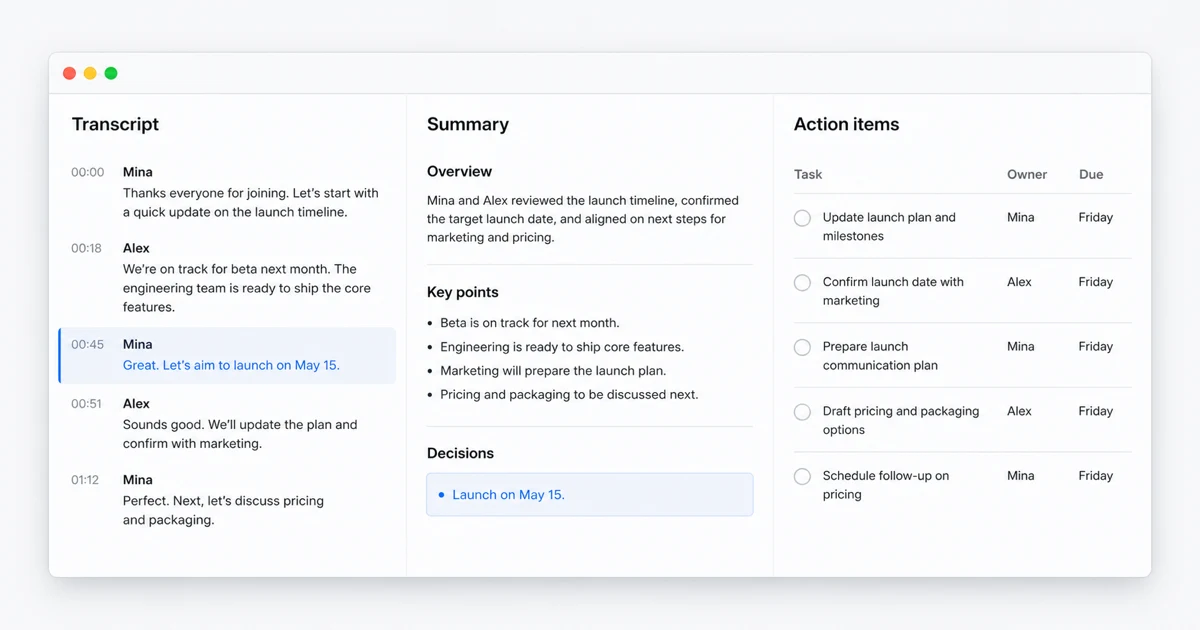
Hereon turns a speaker-aware transcript into decisions and action items
No meeting botNothing joins the participant list
Local by defaultSpeech and translation on Mac
One overlayResizable and click-through
Beyond ZoomMeet, Teams, webinars, videos
01 / How it works

Hereon listens to your Mac, not the meeting room.

Because the caption layer sits on macOS, it does not depend on joining the call or integrating with a specific Zoom workspace.

Start a local caption session beside Zoom.

Open Hereon, choose the language you want to read, and start listening. Hereon captures system audio, transcribes the speaker, translates the text, and places the result in a floating overlay.

  • Keep Zoom in its normal window or full screen
  • Resize and position the caption overlay
  • Toggle captions from anywhere with a keyboard shortcut
  • Review the meeting later in local history

No host configuration for Hereon itself.

Hereon runs as your own Mac app, so it does not ask the host to admit a bot or install a meeting integration. Your organization may still have its own rules about recording or transcription. Follow those rules and get consent when required.

02 / Built-in or independent

Zoom captions and Hereon solve overlapping, not identical, problems.

Zoom's native feature is integrated into the meeting. Hereon is a personal Mac layer that follows any audio source.

Decision pointHereonZoom translated captions
Where it runsIndependent macOS appInside the Zoom meeting interface
AvailabilityYour Hereon trial or licenseHost needs an eligible plan or add-on and the feature enabled
Host dependencyNo Hereon setup by the hostHost account and settings determine availability
Other audioAlso works with Meet, Teams, webinars, and videosLimited to Zoom meetings and webinars
Processing modelLocal speech and translation by defaultProvided as part of the Zoom service
After the callLocal searchable history and Markdown exportZoom separates live captions from retained meeting transcripts

Zoom facts checked August 12, 2026 from official support pages for translated caption settings, viewing translated captions, and caption and transcript changes. Zoom plans and features can change. Swingby is not affiliated with Zoom.

When Zoom's built-in captions are the better choice.

If the meeting host has already enabled translated captions and your target language is available, the native Zoom experience is convenient. Captions live inside the meeting client, participants can select their reading language, and you do not need another app.

Use the built-in feature when your organization manages Zoom centrally and wants all accessibility features controlled through that account. It is also the clearer option when company policy requires meeting data to remain within approved Zoom settings.

When an independent Mac overlay helps.

Hereon is useful when you cannot control the host's Zoom plan or settings, when you move between meeting platforms, or when the sound is not a meeting at all. The same caption workflow can follow a Zoom call in the morning, a Google Meet session after lunch, and a webinar or recorded video later.

The overlay is resizable, translucent, and designed to stay above the work without taking over the screen. It can be click-through so your mouse continues interacting with the app underneath.

Local processing and responsible use.

Hereon's public build uses local speech recognition and local translation options. It does not expose cloud engines, and no bot joins the call. Meeting history and exports stay on your Mac.

Technical privacy does not replace human consent or workplace policy. Meetings can contain confidential or personal information. Tell participants when required, respect company rules, and avoid retaining a transcript you should not keep.

Languages and accuracy.

Hereon can translate captions into English, Korean, Japanese, Chinese, Spanish, French, or German, or match the target to your system language. Speech recognition supports the languages available through the selected local engine.

Accuracy changes with language pair, audio quality, speaker clarity, accents, crosstalk, and specialized vocabulary. Use the free trial with a real meeting setup before relying on any automated caption system for critical interpretation.

03 / FAQ

Zoom translation questions.

Does Hereon join a Zoom call as a meeting bot?

No. Hereon captures audio from your Mac and displays captions in a local overlay. It does not join the Zoom meeting as a participant.

Does Zoom already have translated captions?

Yes. Zoom offers built-in translated captions when the host account has an eligible Zoom Workplace plan or translated captions add-on and enables the feature. Hereon is an independent Mac option that also works across other audio sources.

Can Hereon save the Zoom transcript?

Yes. Hereon can keep a searchable local meeting history and export a session as Markdown. Use those features only when your meeting policy and participant consent allow it.

Will it translate every sentence perfectly?

No. Automated speech recognition and translation can make mistakes. Audio quality, overlapping speakers, accents, and technical terms all affect the result.

Bring your own caption layer to Zoom.

Try every Hereon feature for 7 days. Buy the $29 personal license only if it fits your meetings.

Download for Mac